Wednesday, 2 May 2012

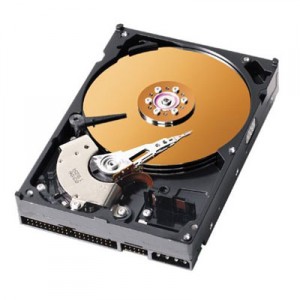
HOW TO FORMAT A LAPTOP HARD DRIVE ( 1)

There are several reasons that a laptop's hard drive may need to be formatted. Heavy use and abuse of Windows, installing and removing large numbers of programs and virus infestation can all cripple Windows to the point that a re-installation of the operating system is needed. It's possible, too, that you have purchased a new hard drive to replace a failed drive or to give higher storage capacity, and need to format that drive to prepare it for Windows installation. Using a Windows installation disk or software provided by the hard drive manufacturer, makes it easy to format. Read on to learn how to format a laptop hard drive.

 Things You'll Need
  • Windows installation media (and product key)
  • Manufacturer software

Instructions


    • 1
      Ensure that the hard disk is installed properly in the laptop. The drive cannot be formatted before it is installed, or if it's not installed correctly.
    • 2
      Gather the required software. The type of media will depend on the hardware in your laptop. Older computers without a CD-ROM drive, will require the use of the operating system floppy disks. Laptops that can run Windows XP require the installation CD and product key. Older versions of Windows also have disk-formatting capability in the installation process, and the installation media is either a CD or floppy disk.
    • 3
      Place the installation disk or manufacturer software in the drive and then boot the computer. Early in the installation process, the Windows installer has a step that will detect any installed hard disks and allow for them to be formatted. The software from the disk manufacturer will also detect the hard disk and give you the option to format the drive.
    • 4
      Determine which file system is to be used. Windows XP will either work on a NTFS file system or an older VFAT file system. Choose the desired file system when prompted.
    • 5
      Decide whether the whole disk should be formatted or if the disk will be partitioned and each partition to be formatted separately. The Windows installer includes a menu-driven utility that will create hard disk partitions before formatting. If the hard disk is being formatted to replace an existing Windows installation, delete the existing partitions and re-create them.
    • Format the hard disk with the Windows installer when prompted. The Windows installer will let you know when it is time to format the disk and ask for confirmation.

Tips & Warnings

  • The manufacturer software that comes with a laptop hard drive will sometimes include disk-formatting capabilities, but will not install Windows.

Tuesday, 1 May 2012

How to format a computer and reset your computer back to the default settings:

***********WARNING************
(also known as reformatting, wiping or restoring your computer to factory defaults) The following steps will delete all of the information off of your computer’s hard drive.  Please make sure that you have backed up all your data, programs, address book, data, calendars, etc, etc.  It will ALL be gone after these formatting steps

***********WARNING************

What is the benefit to formatting my computer?  How to format the computer’s hard drive:

These steps are for formatting your primary drive (normally C:\) in Windows 2000, XP, Vista, and Windows 7 and to reinstall the operating system.

The easiest way to format your computer is by locating your operating system CD.  Look for a CD or DVD that specifically says “Operating System” or “System Restore”.    Insert the installation disc into your CD or DVD drive. 
Restart your computer. 
When your computer is restarting, you will be prompted to “Press any key to boot from CD”.  Simply press any button on your keyboard when you see this message.  If you do not see this message when you restart your computer, you may need to reset your boot disk sequence. *
*To reset the boot sequence, go into BIOS mode.  To do this, restart your computer and while restarting press the F1, F2, F10, or maybe the delete key (your computer screen will say “To enter setup press xxx”.  You only have a few seconds to press the correct  key, so if you miss it you will need to restart your computer and try again.  Once you have successfully entered the BIOS mode, look for your boot sequence options.  Set the CD ROM drive to be the 1st in the boot sequence.  Save your changes and exit.
The CD will load a blue screen, then after a few minutes will ask you to press Enter to set up Windows.
You will then be prompted to select where to install Windows.  There will be a box on the lower half of your screen that will either show “Unpartitioned space xxxMB” or will have “Partitioned space xxxMB”.  Highlight which partition you wish to format (typically it will be the unpartitioned space or the space with the largest partition by most megabytes).  Hit Enter after selecting the space to partition.
The next step is to choose which file system to format the drive with.  The NTFS option will be the fastest option.  For most formatting purposes, choose the option that ends in “Quick”.  Press Enter when done.
The computer will then begin the formatting process.  This process may take a while depending on the size of the hard drive you are formatting and the speed of hard drive.
As soon as the drive has been formatted, the operating system files will be copied to the hard drive and the operating system will start installing.


52 Ways to Make Extra Money by Oluwalana Samuel · 103 comments

I’ve written a lot lately about getting rid of debts and reducing expenses. I thought it was time I address the flip side of your finances: Ways to make extra money.
Thanks to suggestions by my Twitter followers, readers, and other bloggers I’ve been able to put together a solid list of 52 ways to make extra money. Most, if not all of these ways to make money, can be done even with a full-time job.
I obviously haven’t tried all of these methods, but when possible I’ve tried to (link) to an example of the opportunity actually making money. You should be able to find something here that fits you and your skills.

1. CashCrate – There’s some money to be made with CashCrate.com completing the free offers, but the real cash comes from the referral program. Earn extra money at CashCrate.com by taking part in daily research surveys, doing your shopping online, and referring other members to their program.

2. Waiting Tables – This is the perfect job for nights and weekends. That’s when all the big tips are made anyway. Pick the nicest place in town.

3. Bar Tending – Even better, I think, than waiting tables is tending the bar at nights in a busy bar. Typically at least $1 for every drink you serve.

4. Teaching Swimming Lessons - If you’re a good swimmer you might be able to pick up a weekend swim teacher gig at your local recreation center. Keep in mind that some places may require a special certification or that you be a lifeguard.

5. Car Valet – If you hook up with a for-hire car parking service (the type hired out for fancy neighborhood parties) you can make some nice cash tips in just a few hours at night and on the weekend, when parties are held.

CHIDI MOKEME TIES THE KNOT


Friends, family and fans trooped out in their numbers to celebrate with one of the Nigerian movie industry’s most popular acts and tv personality, Chidi Mokeme, as he exchanged vows with his beautiful bride, Jean Chinwe Olumba at the Our Saviours Church, Tafawa Balewa Square, on Saturday, April 28, 2012.
The spectacular wedding ceremony was witnessed by a cross section of members of the entertainment industry as well as top notch professionals from other sectors, including the Honourable Minister of Culture and Tourism, High Chief Edem Duke, who was the chairman of the occasion.
Entertainers who came out in their numbers to witness the grand event included comedian, Richard ‘AY’ Makun, who was also the compere of the event, Ramsey Nouah, Emeka Ike, Kate Henshaw, Desmond Elliot, Keppy Ekpeyong Bassey, Basket Mouth and a host of others.
The newly wedded groom, Chidi Mokeme, who was beside himself with joy thanked all for partaking in his most joyful day, and extolled the virtues of his bride, whom he described as a jewel of inestimable value.
Highpoints of the reception, held at the Muson Centre, Onikan, included the cutting of the cake and the couple’s first dance.
Chidi ‘GQ’ Mokeme is an actor, model and ocassional tv presenter, while his wife, Jean Olumba is a medical doctor based in the U.S.
 Story by Samjazzy

Nollywood’s Top 5 Sexiest!

The Top Five Charming Dudes:
Hot. Spicy. Ready-to-be-chewed. Princely. Suave. Charming. Drop-dead delicious. Here’s NET’S pick of top 5 sexiest actors…
Ramsey Noah:

Ramsey intoxicates, like sweet wine. His sweet-sounding voice, his screen presence, self-confidence, and exceptional acting ability deserve applause. Probably the sexiest guy in Nollywood, Ramsey manages to keep his private life – private, which is a very smart, mature and sexy thing! There’s a mystery about him; after many years on our screen yet not one social flaw. Can someone please shout halleluyah! Sensuously striking with heavenly good looks, Ramsey, like (yes) wine, gets better with age. In his movies, his eyes speak – all of the kindness, joy, ecstasy, thrill, and pain come through, and you just want to grab a pillow and weep for the sheer joy of watching someone so sexy and talented. Ramsey captivates, excites, engages and enchants. Can we please get pin-ups, T-shirts and baseball caps of this beautiful man? Amen!

Jim Iyke: