Monday, 20 October 2014

21 WAYS ON HOW TO SUCCEED IN BUSINESS


What is Business? Is the commercial dealings that a person or organization has with another person or organization

1. Work by design, not by default.
Many people choose a career with minimal knowledge of what skills are needed, what the day-to-day work involves, and whether it’ll make them happy. Some start down one path, pulled toward one of the careers that recruit the hardest, where corporate profits are highest but employees are least satisfied. Then inertia and circumstance dictate which direction their career goes. In effect, they let their career choose them, rather than the reverse. Instead, be proactive. Decide what direction you want to go, and then start moving in that direction, today.

2.   Take responsibility for your career.
The days of working at one company for a lifetime and relying on a pension and social security are long gone. Have an internal locus of control: you are in charge of your career and your life. Design your own career, because if you don’t, others will.

Sunday, 21 September 2014

9 Ways To Make Your Online Business Look Professional

Building an online business often means you’re on your own and starting from scratch — no IT department to set up your email, no design guru to make a logo, no professional writer to craft website copy. So most bootstrapped entrepreneurs use their current resources to get things going, like utilizing a personal email address and phone number for business interactions.
But once you’re up and running somewhat smoothly — because let’s face it, you’ll never stop putting out fires, even if you become a Fortune 500 company — it’s time to start cleaning up your business and separating the personal from the professional.
A lot of this cleanup means focusing on branding. Your brand is the look and feel of your business. It is defined by the elements that set you apart from your competitors. And if you want to stand out in a crowded market, every little detail counts. Here are nine quick and easy steps to get from “brand new” to “branded.”

1. Get a dedicated phone number

Having a dedicated number for your business is a no brainer. It allows you to share your contact details without giving out your private phone number. It ensures you don’t accidentally answer a customer’s call with an unprofessional “Yo, what’s up?” Plus you probably don’t want your customers to hear that five-year-old voicemail greeting featuring the “Fresh Prince of Bel-Air” theme song.
You can go the old-fashioned route and get a dedicated cell phone line for your business, but it is probably cheaper and more convenient to set up a Google Voice number. In addition to being free, you’ll have a separate number, online storage of your voicemails and the ability to forward your incoming calls to any phones that you want.

Saturday, 19 July 2014

7 Reasons Your Business Needs A Blog

While it is possible to run a successful business without a blog, it sure is handy to have hundreds of potential customers milling around your blog waiting to hear your witty status updates and see behind-the-scenes photos of your life. While you’re in the stages of starting up, take a little time each day and devote it to writing blog posts and getting a wicked-awesome blog designed. Trust me, it comes in handy. Here’s how: 

1. MAKING CONNECTIONS
Try not to view your competitors as your evil arch enemies. They‘re just down-to-earth creative girls like you, on a mission similar to yours! Embrace that. Go out for a coffee with them, skype them, start a Google + hangout with them and learn from them. If they are swamped with work one month, they may refer someone they can’t work with to you. Referrals from friends in the business is a great way to get work.  

2. MEETING POTENTIAL CLIENTS
Many of my design clients were my blog readers first. How exactly do you turn a reader into a client? Self promotion! Let your readers know (but not in a spam kinda way) what you do, provide them with links to your shop/portfolio and give

10 Things You Don’t Need in Your sidebar (Blogger and WordPress)

Your blog content is the star of the show, right? Those beautiful photos, helpful tips, quick tutorials… They are the things you want to draw readers in to and hook them on. So why are you overshadowing your content with a messy sidebar?

Your sidebar should align with your blogs goals and priorities. It should look simple and clean instead of cluttered and confusing!

10 things you don’t need in that sidebar of yours:
1. A list of blogs you love. It’s nice to support bloggers you love by linking to them, but the hard truth is that readers will click those links, leave your site, and most likely forget to return because they’re totally transfixed by the blog you’ve pointed them to.

2. A section on ‘things you love’, like t-shirts from Target and sunnies from Modcloth.  Unless you’re a fashion blogger who is being paid to promote these items in your sidebar, you have to ask yourself if it’s really necessary.

3. A mini slideshow of your Instagram feed. I totally get why people add this and it does add personality and realness to your blog, to some degree. But if you don’t use Instagram much, then please remove it from your sidebar. It distracts readers from more important things, like signing up for your newsletter or following you in a reader!

4. A never-ending list of categories. Keep it simple and stick to 5 or 6.

5. A never-ending list of archive links. If you’ve been blogging for a long time, then have a drop down archive option to keep your sidebar looking simpler (and a lot shorter!)

6. Counters. How many people visit your site is of no concern to your readers, so think about removing counters from your sidebar and keeping up with stats through Google Analytic instead.

7. A disclaimer. I personally prefer to put disclaimers in the blog footer and keep the extra sidebar space for more useful things, like follow buttons or social media buttons!

8. A social media plugin to a social media site you barely ever use. If you don’t use Twitter but you have a Twitter feed in your sidebar, remove it to avoid wasting your reader’s time. Find a social media site that you use regularly and steer your readers in that direction. It’ll benefit them a ton more!

9. Embedded media. Embedding too many things (like YouTube videos) in your sidebar can really slow down your blog. And what do people do when you site takes longer than 10 seconds to load? They leave, sadly enough.

10. Blog awards that no one has heard of. Remove anything like this from your blog because it gives a ‘naive and amateur’ impression. It’s nice to have and give blog awards, but most people will sadly not pay any attention to them. Unless you were awarded by Teen Vogue or ProBlogger or something. Then maybe you can keep those up there. ;)
 

Tuesday, 15 July 2014

Creating facebook App for Website that doesn't support HTTPS

Have you ever tried to create a new Facebook App for your website which doesn't have HTTPS support?
Even you can't create a Facebook Page tab for pointing to your website without HTTPS support! The working of this trick is described in the following picture.
I am going to show you how to create any Facebook app for your website without HTTPS support.
For that you need to create a Google site and embed an iframe in it to point to your website.
This is because Google site provides HTTPS support.

Step 1:
Create a Google site. If you already have a Google site, skip this step.
Sign in to your Google account and go to Google site (Follow the link in new tab).
Click on "Create site".
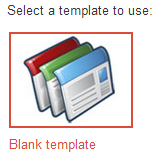
Choose a Blank template.


This is because you are going to embed only an iframe that points to your website. Hence a good looking template for your Google site does have no deal for you.

creating Google site

After choosing a blank template, enter a site name and click on "Create".

Step 2:
Once your site is created, edit the home page.
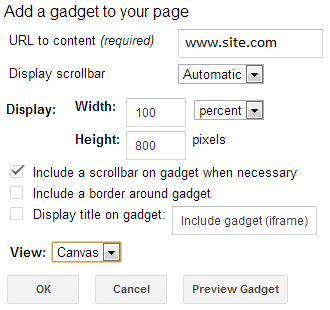
Go to Insert->More Gadgets and choose iframe widget as shown below.

Now enter your website url in the URL field.


Save the changes and test your newly created google site.

Step 3:
If you did the above two steps correctly you night see your website home page inside the newly created site.
Also note that header and footer of google site are visible.
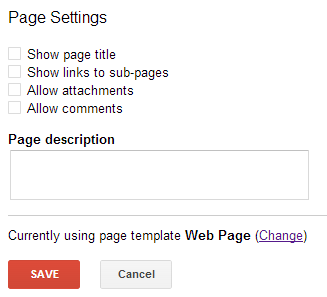
Press 'u' key, and the following dialog is displayed.


You can hide the header and footer easily. Just un-check all options as shown above.

Step 4:
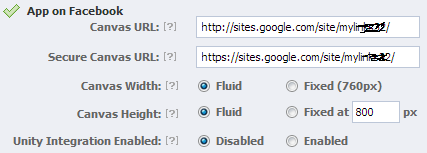
Create a new app for Facebook with your new Google website. Go to Facebook Developer Page.


Now you are able to enter both HTTP and HTTPS.

>>>> share if you like <<<<