Friday, 4 July 2014

N1.8m Job Scam: EFCC Rejects Settlement Claim By Accused Persons.

Request by two accused persons who are standing trial before Justice V. N Agbata of the Anambra State High Court Onitsha, on a 12-count charge of obtaining money under false pretence, that their trial be discontinued as they have settled with the complainant, was rejected by the Economic and Financial Crimes Commission, EFCC.

Bernard Sunday Chukwuma and Anyiam Isabella, were arraigned by the EFCC on May 19, 2014 for allegedly obtaining various sums of money totalling about N1,800,000.00 (one million, eight hundred thousand naira) from  one Okey Obiagwu and four others under the pretext of helping them to secure jobs at the Onitsha North LGA of Anambra State.

Protesters In Southern Kaduna Demonstrate Against Mass Killings

“How can 147 sons and daughters of a state be killed in one fell swoop in Kaura villages, and a sitting governor would not go to see and speak to the aggrieved since February, and again about 200 have been killed in mass invasions of Sanga villages, and the governor does not have the moral courage to visit any of the affected places or persons.” 

 Hundreds of youth protesters in the southern Kaduna area of Kaduna State today demonstrated against the incessant killings of inhabitants by armed herdsmen. The demonstration started in the morning (Nigerian time) and lasted into the afternoon.

Conference Decides On Zonal Presidency, State Creation, And National Anthem

The National Conference on Thursday resolved that henceforth, the office of the President of Nigeria shall rotate between the North and South and revolve among the geo-political zones.

It was also agreed that the office of the state governors shall be rotated among the three senatorial districts of each state while that of the local government chairmen shall to be rotated within the local government areas.

Also, local government councils not democratically elected shall not be recognized by all authorities and persons and would not be entitled to any revenue allocation from the Federation Account or the Account of the State Government or exercise any function exercisable by local government councils.

Thursday, 3 July 2014

How to Change Your Facebook Timeline Cover Photo

If you’re brand new to Facebook, your Timeline may seem a little empty compared to those of your friends. You need a cover photo. Your Timeline will fill up shortly. But first, you want to get the basics filled out so that people can find you and learn about you. The first thing people will see when they arrive on your Timeline is your cover photo and your profile picture.
These two photos at the top of your Timeline present the first impression to all visitors to your Timeline. The cover photo is the larger photo that serves as a background to your Timeline. People often choose visually striking photos or images that speak to who they are and what they love. To change your cover photo, follow these steps:
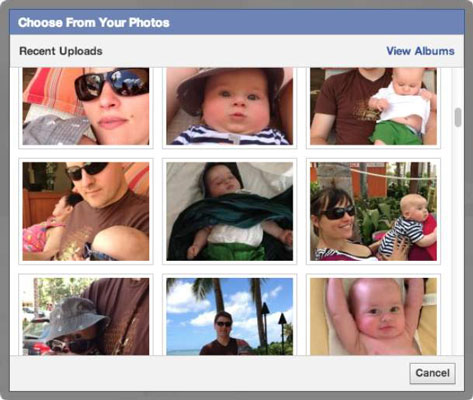
  • Click Choose from Photos to select a cover photo from photos you’ve already added to Facebook.
    The Choose from Your Photos window appears. By default, it shows Recent Uploads. You can get to a full list of your photos by clicking View Albums in the upper-right corner.

    1. Hover over your existing cover photo.
      A Change Cover button appears on the right side of the photo.
    2. Click the Change Cover button.
      The Change Cover menu appears with four options: Choose from Photos, Upload Photo, Reposition, and Remove.

      If you’re using a Facebook Mobile app that syncs with your phone, you may also see an option to Add Synced Photo.

    3. Choose Upload Photo to select a cover photo from your computer.
      image0.jpg
      A window for navigating your computer’s files appears.
    4. Select your cover photo by clicking your desired album and then the desired photo.
      This brings you back to your Timeline, where you should see the new cover photo in place with the overlaid message, Drag to Reposition Cover.
    5. Select the photo file you want as your cover and click Open.
      This brings you back to your Timeline, where you should see the new cover photo in place with the overlaid message, Drag to Reposition Cover.
      Because the cover photo spans the width of your Timeline, you may occasionally find that when you try to add some photos as your cover, you get an error telling you that it isn’t wide enough. Make sure your cover photo is at least 720 pixels wide to ensure that it will fit.
    6. Click and drag your cover photo to position it correctly within the frame of the screen.
    7. Click Save Changes.
      Your new cover photo is now in place.
    If you don’t like the way your cover photo is positioned, you can use the same Change Cover menu to either reposition or remove your cover photo. You can change your cover as often as you want.
    Your profile picture is the smaller photo. This photo is what sticks with you all around Facebook, appearing wherever you comment or post something. For example, your friends may see your status post in their News Feeds, accompanied by your name and profile picture. Most people use some variation on a headshot for their profile picture. There are several ways to add a profile picture.

    5 FOODS THAT KEEP HAIR FROM GROWING.

    1. Sugar

    For your hair’s sake, please step away from the sweets. Sugar can interfere with the absorption of protein and we all know how important protein is for your hair. Vitamin E is also essential for healthy hair growth and sugar can lower the level of vitamin E that needs to get to your strands! Don’t fret-- this doesn't mean you have to cut out sugar altogether. It just means that you should reduce your intake. You should consider substituting for natural sources of sugar like fruits or vegetables if you can't kick the habit.